Digital signage is no longer limited to retail stores and corporate lobbies. Healthcare facilities, from large hospital networks to small outpatient clinics, are deploying screens to address communication gaps that directly affect patient experience and operational efficiency. The demands of a healthcare environment are distinct. Patients are often anxious, time is critical, and information must be accurate and timely. A well-planned digital signage network can serve as a quiet, ever-present layer of communication that reduces strain on staff while keeping patients informed and oriented.
Why Healthcare Needs Digital Signage
Hospitals and clinics are information-dense environments. There are appointment schedules, wait times, directional needs, health education materials, and emergency alerts, all competing for attention in spaces that are often noisy and emotionally charged. Traditional signage, printed posters, and static bulletin boards cannot keep pace with the volume and velocity of information in modern healthcare.
Digital signage offers three core advantages in this context. First, it enables real-time updates. A screen in a waiting area can display current wait times, reducing the number of patients who approach the front desk to ask how much longer. Second, it supports visual wayfinding. Large medical campuses can be disorienting. Interactive kiosks or strategically placed directional screens help patients and visitors locate departments, parking, or amenities without requiring staff intervention. Third, it creates a platform for health education and preventive messaging, turning idle waiting time into an opportunity to inform patients about wellness programs, vaccination schedules, or chronic disease management.
Patient Communication and Experience
The patient journey through a healthcare facility involves multiple touchpoints where uncertainty creates friction. Digital signage can address many of these moments directly.
Waiting Room Screens
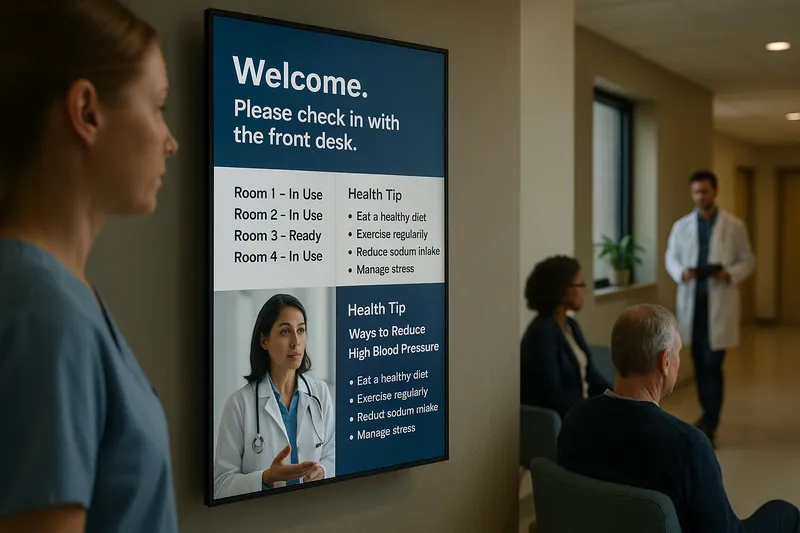
Waiting rooms are the most common starting point for digital signage in healthcare. A single screen can cycle through estimated wait times, queue numbers, health education videos, and facility announcements. The key is to balance information density with calm. Overstimulating content or rapid transitions can increase anxiety in patients who are already under stress.
Content should be designed with readability in mind. High-contrast text, sans-serif typefaces, and generous spacing between elements make information easier to absorb from a distance. Motion should be minimal and purposeful. A subtle progress indicator showing queue position is more useful than a fast-paced promotional video.
Check-In and Registration Areas
Digital screens at check-in desks can display instructions for new patients, insurance requirements, or forms that need to be completed. This reduces the cognitive load on both patients and registration staff. Some facilities use QR codes on screens to direct patients to digital forms they can complete on their own devices, further streamlining the process.
Patient Rooms and Bedside Displays
Bedside screens represent a more advanced application. These displays can show personalized care information, including the names of attending physicians, scheduled procedures, and dietary restrictions. They can also provide entertainment and relaxation content to improve the inpatient experience. Integration with nurse call systems and clinical dashboards is possible but requires careful attention to data security and compliance.
Wayfinding and Navigation
Large hospitals often function like small cities. Patients may need to travel from parking structures to specialty clinics across multiple buildings and floors. Poor wayfinding is a known source of patient dissatisfaction and missed appointments.
Static Directional Screens
Placed at elevators, lobbies, and corridor intersections, directional screens display maps and turn-by-turn instructions to major departments. Unlike printed maps, these can be updated instantly when departments relocate or construction closes certain routes.
Interactive Kiosks
Interactive wayfinding kiosks allow visitors to search for departments, physicians, or services and receive personalized directions. These are particularly valuable in multi-building campuses. A well-designed kiosk interface should be accessible, with large touch targets, multiple language options, and audio assistance for users with visual impairments.
Outdoor and Parking Signage
Digital signs at parking entrances and building exteriors can direct patients to available parking, display current ER wait times, or provide weather and safety alerts. Outdoor displays must be rated for environmental exposure, with adequate brightness for daylight visibility and protection against moisture and temperature extremes.
Clinical and Staff Communication
Digital signage is not only for patients. Behind-the-scenes applications can improve staff coordination, reduce communication delays, and support clinical workflows.
Nurse Stations and Staff Areas
Screens at nurse stations can display patient census data, bed availability, staffing assignments, and incoming admission alerts. When integrated with hospital information systems, these displays give charge nurses a real-time operational picture without requiring them to log into multiple applications.
Operating Rooms and Procedure Areas
In surgical suites, digital signage can display case schedules, patient prep status, and equipment availability. This helps surgical teams stay coordinated and reduces turnaround time between procedures. Clean, high-resolution screens designed for sterile or near-sterile environments are essential in these spaces.
Emergency Alerts and Code Notifications
Hospitals rely on rapid communication during emergencies. Digital signage networks can be used to broadcast code blue alerts, severe weather warnings, or security lockdown notifications across the entire facility or to targeted zones. The ability to override normal content instantly and push critical messages to every screen is a significant safety feature.
Health Education and Preventive Messaging
Waiting time is an underutilized asset. Patients in clinics and hospitals often spend ten to thirty minutes seated with little to do. Digital signage can convert this idle time into engagement with health education content.
Seasonal and Situational Campaigns
Flu season vaccination reminders, heat wave safety tips, or allergy alerts can be scheduled to appear during relevant times of year. This timeliness is difficult to achieve with printed materials.
Chronic Disease Management
Screens in primary care and endocrinology waiting rooms can show content about diabetes management, hypertension monitoring, or medication adherence. The goal is not to replace physician advice but to prime patients for conversations they will have during their appointment.
Hospitals and health systems often run wellness programs, support groups, or preventive screening events that patients are unaware of. Digital signage in relevant departments can increase participation by raising awareness at the point of care.
Content Strategy for Healthcare Signage
Healthcare content requires a different standard than commercial advertising. Accuracy, sensitivity, and clarity are non-negotiable.
Medical Accuracy and Review
All health-related content should be reviewed by clinical staff or medical writers before publication. Screens displaying incorrect information about symptoms, treatments, or medications create liability and erode trust. Establishing a content approval workflow, even for simple announcements, is essential.
Accessibility Standards
Healthcare facilities serve diverse populations, including elderly patients, non-native speakers, and individuals with visual or hearing impairments. Content should follow accessibility guidelines: captions on all videos, sufficient color contrast, readable font sizes, and multi-language support where appropriate.
Tone and Visual Design
The visual tone should be calming and professional. Avoid aggressive sales language, flashing animations, or crowded layouts. White space is a design asset in healthcare. It reduces cognitive load and makes content easier to process for patients who may be anxious or unwell.
Rotation and Freshness
Even the best content becomes invisible if it never changes. Plan a content calendar that refreshes educational materials, seasonal messages, and facility announcements on a regular cycle. A rotating schedule keeps patients looking at the screens rather than tuning them out.
Implementation Considerations
Deploying digital signage in a healthcare environment involves unique constraints that do not apply to retail or office settings.
Hygiene and Infection Control
Screens in patient areas must be easy to clean and disinfect without damage. Anti-microbial coatings and smooth, non-porous surfaces are important for touchscreens and bedside displays. Some facilities use contactless interaction methods, such as QR codes or motion sensors, to reduce surface contact entirely.
Noise and Disturbance
Patient care areas require quiet. Screens should not auto-play audio in hallways or waiting rooms near patient rooms. If audio is necessary, directional speakers or headphone jacks at kiosks can contain sound to individual users.
Network and Security
Healthcare digital signage networks must comply with data protection regulations. Screens showing patient information, even indirectly through queue systems or bed management dashboards, must be on secure network segments. Segregating the signage network from clinical systems and using encrypted connections for content management reduces risk.
Power and Placement
Medical equipment and emergency systems take priority for power and space. Digital signage installations must not interfere with code-compliant egress, electrical capacity, or medical gas lines. Working with facilities engineering and compliance officers during planning prevents costly relocations later.
Measuring Impact
The value of healthcare digital signage is best measured through operational and patient satisfaction metrics rather than direct revenue.
Reduced Front-Desk Inquiries
Track the volume of patients asking for wait times or directions before and after screen deployment. A measurable drop indicates the signage is fulfilling its informational role.
Patient Satisfaction Scores
Include questions about communication clarity and wayfinding ease in post-visit surveys. Improvements in these categories often correlate with digital signage deployment.
Staff Efficiency
Measure the time staff spend on directional guidance, routine announcements, or manual bed board updates. Time saved can be reallocated to direct patient care.
Health Education Engagement
If screens display QR codes linking to deeper content, track scan rates to understand which topics generate interest. This data can inform future content strategy and identify gaps in patient knowledge.
Getting Started
For facilities new to digital signage, the best approach is to start with a single high-impact location and expand based on measurable results. Waiting rooms and main lobbies offer the clearest return on investment because they address the most common friction points in the patient experience.
Define the purpose of each screen before purchasing hardware. A screen meant for wayfinding needs different placement, size, and interactivity than one meant for queue management or health education. Purpose drives hardware selection, content format, and network requirements.
Establish content ownership early. Healthcare has many stakeholders, clinical, administrative, facilities, marketing, and each may want to use the screens. A governance model that assigns clear roles for content creation, approval, and scheduling prevents conflicts and ensures consistency.
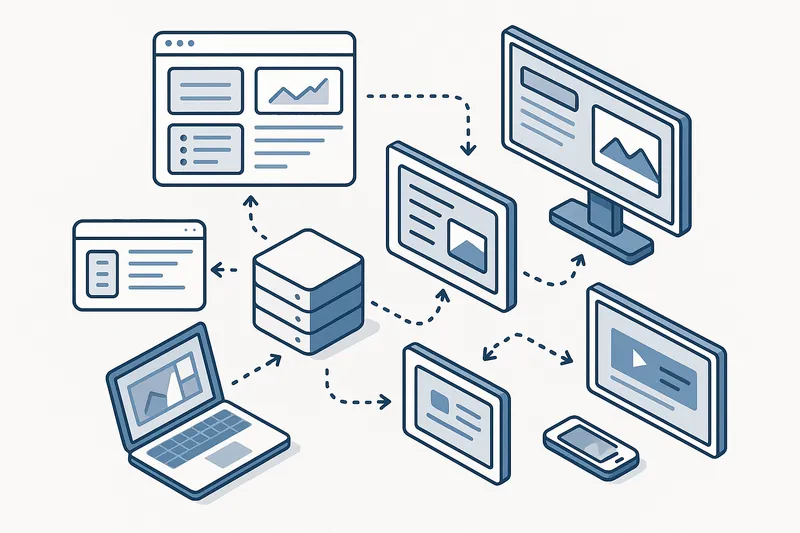
Choose a content management platform that supports remote management, scheduling, and role-based access. In a multi-site health system, the ability to push standardized content to all locations while allowing local customization is essential for brand consistency and operational flexibility.
Conclusion
Digital signage in healthcare is not a luxury. It is a practical infrastructure layer that addresses real problems: patient anxiety, staff overload, navigation confusion, and missed opportunities for health education. The technology itself is straightforward. The challenge lies in designing content and workflows that respect the unique pressures of a medical environment. Facilities that approach digital signage with clear purpose, clinical oversight, and attention to accessibility will see improvements in both patient satisfaction and operational efficiency. The investment pays back in calmer waiting rooms, better-informed patients, and staff who can focus on care rather than answering the same questions repeatedly.