Complete Guide to Remote Management and Monitoring for Digital Signage
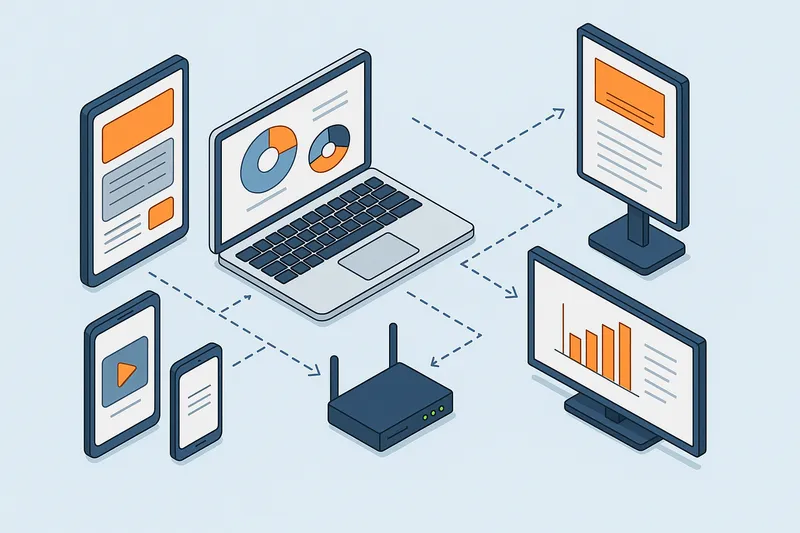
Managing multiple digital signage screens across one or many locations can quickly become complex without an effective remote management and monitoring strategy. Ensuring reliable content delivery and maximizing uptime requires insight into device status, content playback quality, and the ability to swiftly troubleshoot or automate recovery.
In this detailed guide, we explore the key elements of remote management and monitoring for digital signage, including device health metrics, real-time alerts, offline playback safeguards, and automated system watchdogs. Whether you operate a modest network of screens or an enterprise-scale deployment, these best practices will help you maintain robust, scalable digital signage operations.
Why Remote Management and Monitoring Matter for Digital Signage
Digital signage networks can experience a variety of technical disruptions, such as:
- Devices going offline due to network issues
- Screens freezing or showing error messages
- Content becoming outdated or out of sync
- Hardware failures or power interruptions
Without centralized visibility and control, these issues often go unnoticed until a customer or employee reports them — by which time the impact on brand experience or communications is already negative.
Remote management and monitoring systems provide:
- Proactive issue detection to minimize downtime
- Automated alerts to notify operators immediately
- Remote troubleshooting to fix problems without dispatching technicians
- Content and device health visibility for optimization and audit
- Recovery automation such as auto-restart and watchdogs to reduce manual intervention
Core Components of Effective Remote Management and Monitoring
1. Device Health Monitoring
Knowing the real-time status of each signage player and screen is foundational. Key device health metrics include:
- Online/offline status: Detect if a device loses network connectivity or powers off.
- CPU, memory, and storage usage: Identify resource bottlenecks impacting playback smoothness.
- Temperature and power status: Prevent hardware failure by spotting overheating or power irregularities.
- Software version and updates: Ensure devices are running current, secured software builds.
Tools and techniques: Many signage software solutions integrate device polling protocols or cloud-agent software that regularly report these statistics.
2. Remote Screenshots and Playback Verification
Visual confirmation of what displays show at any moment helps verify that content is running as planned:
- Periodic screenshots can be captured remotely for audit or troubleshooting.
- Detection of playback errors, frozen screens, or blank displays.
- Validation that playlists and scheduled content correspond with location-specific programming.
This reduces the need for physical site visits just to confirm correct operation.
3. Offline Playback and Content Caching
Network outages and latency often cause digital signage players to lose connectivity temporarily. Ensuring continuous content playback means:
- Automatically caching playlists and media locally on the player device.
- Switching to cached content seamlessly if the cloud or CMS becomes unreachable.
- Configuring retry logic to reconnect and sync content once the network recovers.
This feature prevents blackouts or default error screens during interruptions.
4. Automated Recovery: Auto-Restart & Watchdogs
Automated systems greatly reduce downtime and manual troubleshooting:
- Auto-Restart: Screens or players reboot automatically on system hangs or crashes.
- Watchdogs: Software monitors critical playback services and restarts them if they fail.
- Scheduled restarts during low-traffic periods as preventive maintenance.
Such automation keeps operations smooth without constant human oversight.
5. Alerting and Notifications
Instant notifications enable troubleshooting teams to respond immediately:
- Alerts triggered on device offline status, playback failure, or hardware errors.
- Escalation chains can be set up (SMS, email, push notifications).
- Alerts based on thresholds (e.g., temperature exceeding safe limits).
Timely alerts minimize response times and mitigate impact.
6. Multi-Site and User Role Management
For large deployments:
- Remote management systems should allow grouping devices by region, site, or function.
- Role-based access controls (admin, operator, technician) secure who can perform actions remotely.
- Multi-user dashboards streamline coordination.
This hierarchical control enhances scalability and operational security.
Best Practices for Deploying Remote Management and Monitoring
Plan for Network Reliability and Security
- Use wired ethernet connections where possible for stability; supplement with cellular backup if critical.
- Secure remote access using VPNs and encrypted tunnels.
- Monitor bandwidth usage to avoid bottlenecks affecting content updates.
Choose Remote-Capable Hardware
- Select signage players and screens with native support or compatibility for remote diagnostics.
- Verify firmware can be updated remotely.
- Confirm signage software supports remote management protocols.
Implement Robust Content Caching Policies
- Pre-load playlists and media for at least several hours offline playback.
- Regularly refresh cached content during healthy connectivity.
- Test recovery functionality periodically.
Automate Routine Maintenance Tasks
- Schedule daily or weekly restarts timed for minimal audience impact.
- Use watchdogs to monitor critical playback services and reboot failed apps.
Establish Clear Alerting and Incident Response Workflows
- Define alert thresholds carefully to balance noise and responsiveness.
- Document roles and responsibilities for on-call staff.
- Use dashboards that consolidate device statuses.
Leverage Analytics and Reporting
- Analyze uptime trends to identify recurring hardware or network issues.
- Use playback logs to verify content compliance.
- Optimize energy and bandwidth consumption remotely.
Practical Example: Remote Management in a Retail Chain
Consider a retail chain operating 200 digital menu boards across 50 stores. Using a cloud-managed CMS with integrated remote monitoring:
- IT staff monitor all players’ online status from the central dashboard.
- If a player loses connectivity, an alert is sent immediately.
- The team remotely accesses screenshots to confirm if the local cached content is showing.
- If the screen is frozen, they trigger a remote reboot, restoring service without the need for in-store technician dispatch.
- The system automatically applies software updates during overnight hours.
- Playback logs help marketing verify correct promotions are running per location.
This reduces on-site visits, controls operational costs, and improves customer experience with reliable displays.
How EasySignage Supports Remote Management
EasySignage offers comprehensive remote management features such as:
- Real-time device health indicators.
- Remote screenshot capture for playback verification.
- Offline playback support with intelligent content caching.
- Automated player restarts and watchdog monitoring.
- Cloud access for multi-site device grouping and role-based permissions.
Using EasySignage streamlines managing digital signage networks, allowing businesses to maintain high uptime while focusing on strategic content delivery.
Conclusion
Robust remote management and monitoring are critical to maximizing the effectiveness and reliability of digital signage networks. By implementing comprehensive device health tracking, remote verification, offline playback safeguards, and automated recovery features, businesses can minimize downtime and operational costs even across complex multi-site deployments.
Investing time into setting up the right tools and workflows ensures your digital signage stays impactful, visible, and error-free — delivering consistent, engaging communications every day.
Got questions about remote management setups or how to optimize your signage network remotely? Feel free to reach out or comment below!