
How to Choose the Right Digital Signage Screen: Key Factors for Commercial Success
Introduction Selecting the right screen is a pivotal step in any digital signage project, directly impacting visibility, reliability, and overall …
Read Article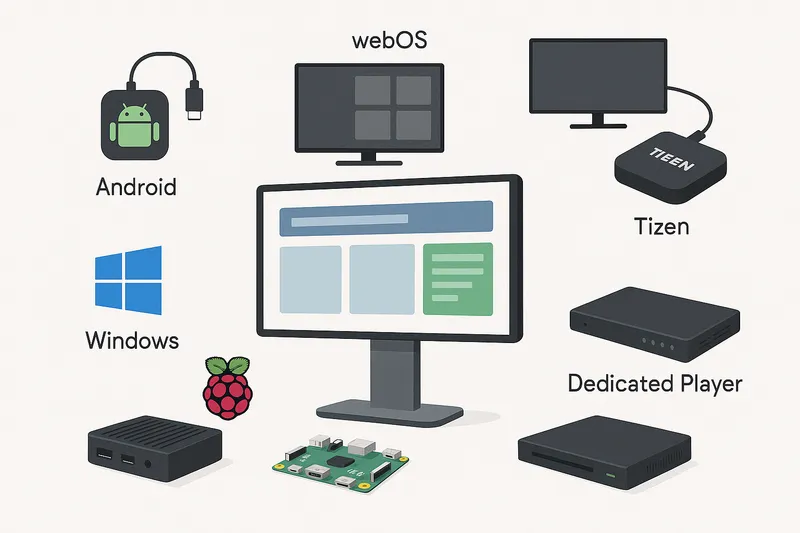
When it comes to digital signage, the choice of player hardware is crucial. The media player drives your content, manages your playlists, and ultimately affects reliability, performance, and cost. Understanding the strengths and weaknesses of the available hardware platforms will help businesses and integrators make informed decisions tailored to their unique technical and budgetary needs.
In this article, we compare six common types of digital signage player hardware:
The digital signage player acts as the interface between your signage software and your display screen. It downloads, decodes, and plays multimedia content according to schedules and triggers. Your choice influences:
Android players are popular due to their affordability, flexibility, and wide commercial availability.
Pros:
Cons:
LG’s webOS platform is baked into many LG commercial displays and available as standalone players.
Pros:
Cons:
Samsung’s Tizen OS is embedded in Samsung smart signage displays and also offered in standalone players.
Pros:
Cons:
Many digital signage applications leverage Windows PCs or mini-PCs as players.
Pros:
Cons:
Raspberry Pi offers a low-cost, compact, single-board computing option popular in maker and DIY signage setups.
Pros:
Cons:
Devices designed exclusively for digital signage, such as BrightSign, IAdea, or Navori players.
Pros:
Cons:
| Feature | Android Player | webOS Player | Tizen Player | Windows Player | Raspberry Pi | Dedicated Player |
|---|---|---|---|---|---|---|
| Cost | Low | Medium | Medium | High | Very Low | Medium to High |
| OS Updates | Variable | Regular by LG | Regular by Samsung | Frequent | Community-driven | Vendor-provided |
| Content Support | Broad | Excellent | Excellent | Excellent | Moderate | Excellent |
| Customization | High | Moderate | Moderate | Very High | Very High | Limited |
| Hardware Reliability | Variable | High | High | Variable | Variable | Very High |
| Integration Support | Good | Good | Good | Excellent | Moderate | Excellent |
| Power Consumption | Low | Low | Low | High | Very Low | Low |
| Suitable for 24/7 Use | Yes (some models) | Yes | Yes | Possible | Not recommended | Yes |
Determine Content Complexity
Consider Deployment Size and Scale
Evaluate Budget Constraints
Integration Requirements
Power and Physical Environment
Support and Maintenance
A retail chain plans to deploy digital signage across 50 stores showing promotions, video ads, and interactive wayfinding.
Recommended Player:
Android players could be considered for less critical locations with tighter budgets but may require more operational support.
Choosing the best digital signage player hardware depends on content complexity, deployment scale, budget, and maintenance capabilities. Android players offer affordability and flexibility but require careful management of OS fragmentation and security. webOS and Tizen players, optimized by LG and Samsung respectively, provide powerful native platforms with seamless integration on their commercial displays. Windows players suit complex enterprise environments requiring extensive integration, while Raspberry Pi offers a low-cost option for simple or experimental signage.
Dedicated purpose-built players stand out with unparalleled reliability, remote management, and multimedia performance, justifying their higher cost for mission-critical and large-scale deployments.
By weighing these factors and understanding your specific use case, you can select a digital signage player that maximizes performance, reliability, and return on investment.
If you’re interested in exploring player options with your current digital signage software or want help defining your hardware strategy, consult with experts or your CMS provider to align your choice with software compatibility and future scalability.
Introduction Selecting the right screen is a pivotal step in any digital signage project, directly impacting visibility, reliability, and overall …
Read Article
Choosing the Right Digital Signage Screen: A Practical Guide for Businesses Selecting the right display screen is a foundational step in any digital …
Read Article